Categories
Tips

Free your Internet with 1 easy trick!

Ok, I know this looks like one of those ‘cheesy’, ‘fantastical’ ads, but it really is not. There is one, simple configuration I’d like to share with you guys, if you haven’t already know about it.

DNS

‘DNS’ stands for Domain Name Sys.. yada yada.. whatever. Let’s get started to unlock (aka unblock) your browsers’ potential to surf the web unrestricted – without any speed loss! Do note that this is not a VPN service or any of those ‘lifehacks’ that hide your identity behind the internet. This is just a forwarding service that circumvents the bans/ filters that our big 4-5 internet service providers implement.

(I will be recommending a simplified Cloudflare 1.1.1.1. DNS configuration, so for those of you who already know of them, you can skip the rest of this post.)

That said, I urge you guys to continue practising safe web browsing habits, like not clicking on any suspicious links, or give out banking/ CC information to dubious merchants. There are legitimate reasons to why our ISPs have kept those websites blocked from us.

I will suggest making the following changes on the router-level, so everyone in your household can enjoy the benefits of your I.T. ‘skills’. Alternatively, you can manually configure individual devices so you/ they can still access those awesome sites when not at home.

Now, for the real jizz, there are 2 ways to use Cloudflare’s DNS, and 1 is as easy as installing an app called ‘1.1.1.1.: Faster & Safer Internet’ (check your appstore), and the 2nd method which is slightly complex, but highly recommended by me.

How to configure?

I will start by listing the step-by-step instructions for the few Internet-connected devices that I own. I will recommend doing a manual configuration, over using the app, as you can eliminate the need to download ‘one more app’, and save some battery from keeping the app running all the time.

Android

While I can provide some guidance for Samsung devices, if your phone does not use the same terms as my steps, you’ll have to refer to other online guides.

  1. Go to your ‘Settings’ app, tap on ‘Connections’, scroll down to the bottom, and tap on ‘More connection settings’.
  2. Tap on ‘Private DNS’, select ‘Private DNS provider hostname’ and type in the following text;
  3. 1dot1dot1dot1.cloudflare-dns.com
  4. Hit ‘save’, and go to a blocked/ banned site to see if it works.

iPhone, iOS

Sadly, I do not possess any products that run on Apple OSes, so you will have to refer to online guides for more information

Windows

  1. Go to ‘Control Panel’, or right-click on your Wireless/ LAN taskbar icon, and select ‘Open Network & Internet settings’.
  2. Click on ‘Change adapter options’, and right-click on either the Ethernet, or Wi-Fi icon, select ‘Properties’.
  3. Note that you will have to configure both adapters’ properties.
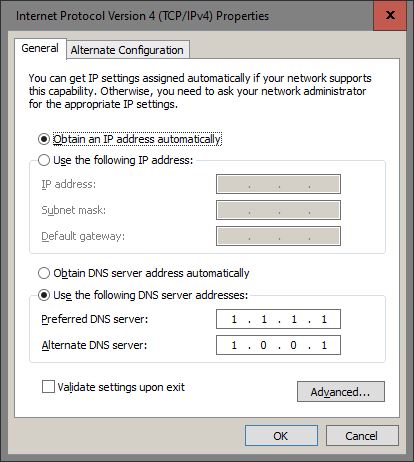
  4. Look for Internet Protocol Version 4 (TCP/IPv4), select it, and click on ‘Properties’.
  5. Enter the values as shown in Pic1;
  6. Click ‘Ok’ when done and close that window.
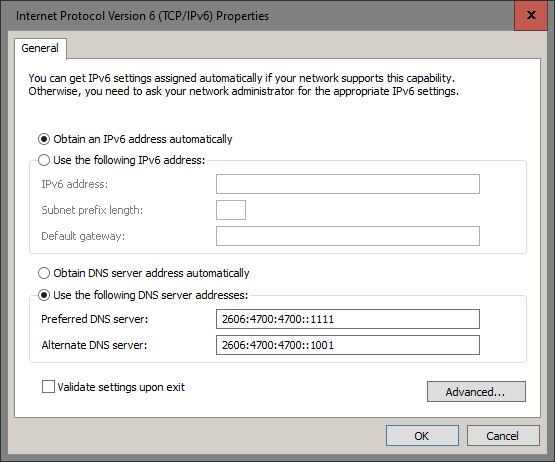
  7. Look for Internet Protocol Version 6 (TCP/IPv6), select it, and click on ‘Properties’.
  8. Enter the values as shown in Pic2, or copy+paste as follows; 2606:4700:4700::1111 and 2606:4700:4700::1001
  9. Click ‘Ok’ when done and close that window.
  10. That’s it! Visit some websites you know are blocked and you should be able to access them now.
Routers/ Wireless Routers

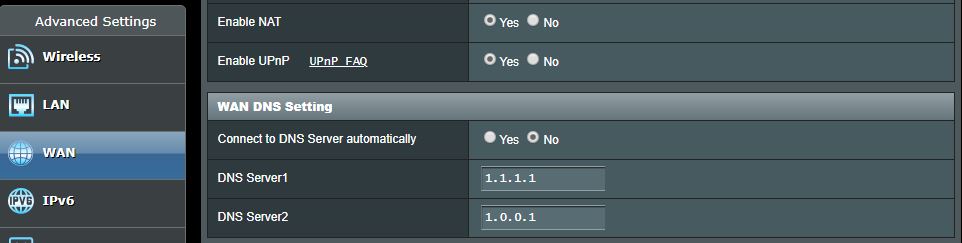
For these devices, I will not be able to provide many useful guides as there are so many brands and types around, but the terms to look out for is the same – DNS. I use an ASUS branded (RT-AC1200G+) and the location to set the above DNS values are found under ‘WAN’, ‘WAN DNS Setting’.
I hope the above tips/ hacks/ tricks will serve you well, while you stay extra cautious when browsing any previously-banned sites, as our ISPs have legitimate reasons to keep them out of our reach.
Categories
Tips

2 New(er) Apps

One for writing, one for passwords. Let’s get started!

Standard Notes

For the few of us who still writes (not just taking notes), I have to make it known that I am no longer using iA Writer, since it crashed a few times midway through a story. I have given it ample chances, and it failed me enough to finally give up on it – in rage.

After scouring the PlayStore for a long time, testing a number of apps, I found one, unlikely, never-heard-before winner. It’s name is Standard Notes (not to be confused with Simple Notes since they have the same abbreviation S.Notes). Once I downloaded it, customised the theme a little, I got hooked on its simple, and straightforward layout.

The two main features that got to me was its almost-word-for-word backup frequency, and a hashtag functionality to keep files organised, there is nothing more a writer/ dabbler could ask for! Apart from those (two), you get a proper archiving system, encryption, cloud storage, and ‘export’ functions.

It’s available for major OSes, for mobile too! Give it a try!

https://standardnotes.org/

Bitwarden

This, might be a little out of topic but I think that it is time, and more important-than-ever, to have a password manager. Despite having ‘similar’ passwords for a number of online accounts, I am less-undaunted to come up with more difficult/ complex ones for my new sign ups.

All your information is stored on the cloud, and it is open-sourced (means free to audit, and free to use!) Auto-fill, auto-remember, password generator, auto-sign-out, it is now a trustee of my credit card information so I can fill out shopping forms with a click!

Anyway, it’s the simplest and least wayang password manager I have ever seen, without so much a promotional shoutout. But here I am shouting them out.

Go check them out and have your password managed! Available on most platforms too!

https://bitwarden.com/

Categories
Tips

Encryption for Dummies

More often than not, we’ve heard news about ‘leaks’, or ‘hacks’, that basically publicised a person’s personal, intimate, and even compromising photos and videos, for the world to see. The damages that stem from such a breach is literally immeasurable, since it affects more than just ‘reputation’.

As guardians of information, protectors of sensitive data, there is a duty to secure whatever files your partner/s have entrusted you with, to an absolute, high standard. For me, I use VeraCrypt.

VeraCrypt, like OTFE (which is now obsolete), is a simplified, straightforward program to do one thing only – encrypt. For newbies, encryption, in simpler terms, is a text-based puzzle that can only be solved by its corresponding ‘cheat code’, which your password is its lock. This particular software, creates a ‘safe’, of a size determined by you, to store all your sensitive data.

vera1

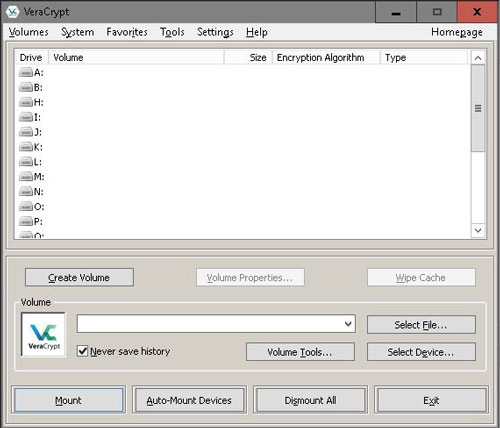
After downloading and installing the program, you should see this window. Start by clicking on the button ‘Create Volume’, and you will be presented with 3 options.

  1. Create a file container (a ‘safe’ in folder format).
  2. Encrypt an external storage device (flash drive, HDD, SSD, CD/ DVD, etc.)
  3. Encrypt an existing partition or the whole hard drive

If you are lost and confused about all of the options, pick the first, and run through the whole process to get an idea about data encryption. Option 1 will create a portable, movable, deletable file, which will open into a familiar Windows Explorer screen.

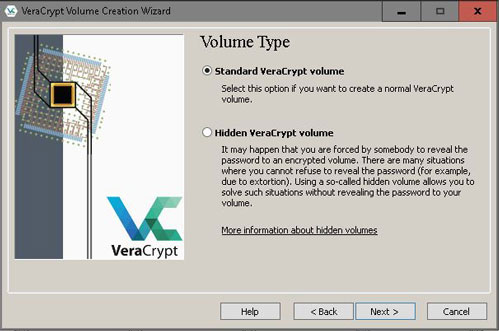
Moving on (From the first option), you will see this window;

vera2

Take your time to read the entire page carefully, and you will realise how expansive this security tool is. Choose either one, and the volume-creating-wizard will walk you through the rest of the way.

The end product of your designated, digital hideout should look like this;

vera3

An unreadable, yes, unreadable file until you locate that file using the VeraCrypt software.

Going back to the first image, you will pick any drive letter (that you like), click ‘Select File…’ and find the (unreadable) file that you just created, and ‘Mount’! Voila! Of course you have to punch in your password next.

According to the developers/ creators, if you forget the password, ‘The only way to recover your files is to try to “crack” the password or the key, but it could take thousands or millions of years (depending on the length and quality of the password or keyfiles, on the software/hardware performance, algorithms, and other factors).‘

In short, let go and delete the container once you forgotten the password. You won’t be afraid of what you cannot recover.

This little guide is just a method of securing digital files that I think may benefit some of you, shady or not, it’s always good to use some form of protection eh?

Categories
Tips

2 Apps (over)Used

This post is out of date as of 29/4/2020. Refer to ‘Articles’ under the ‘Texts’ category for newer apps!

When it comes to productivity, efficiency is the top of my list. Energy is a precious resource like time, and complexity (which consumes time), is sometimes necessary to reduce hassle at later parts. To get around my (almost) daily routine to write, there are some apps I cannot do without, but will find an alternative if they do disappear (or disappoint).

Please note that I do most of my writing on iPad, but some apps are available for Android too.

2. WordPress

As many of you could have guessed, Phantacee.com is powered by WordPress. Compared to Blogger, Ghost (which was so tempting) and many other platforms, WP is can easily be one of the most complex tool if you are just starting out.

After the recent update disappointed me, this APP is now only used to check my site’s stats. But before it went wrong, I use their app heavily to publish my entries as soon as they are done. Skipping the use of Dropbox completely. The Android version is still good though.

1. iA Writer

To have your device crash is the worst fear of many. iA Writer is one app that backs up every word you type. It is truly an app designed for authors, without any intrusive grahics. Black texts on white background, there is no other way to write without distractions.

Cleverly linked to Dropbox (or local storage), I sync all my stories to be posted later (through my desktop). I can’t bold or italicise here, but my programming background taught me enough to implement codes around those important texts. Basic info like word/ character count are available on a tap, else, there is little difference between how you write on paper and on this app.

(There is a ‘focus’ mode that fades out the completed paragraphs, only keeping your current sentence in dark fonts. Another occasionally used feature).

0. Dropbox

Although not necessary to have for iA Writer, it is still a good idea to double check if my stories are correctly synced. In times without my physical inspirational thumbdrive, this app allows me to peep at (outdated) images and videos in really dire times. Please note that iA Writer do REQUIRE a DropBox account to push files into your online storage.


Writing on a computer has been really unproductive for me since I am someone who is easily distracted. I am somewhat grateful for Apple NOT to have multiple windows on their devices, focusing my attention on the current app I am using. As far as efficiency is concerned, I am planning to use an Android tablet for the still-functioning WP app, if not a Microsoft powered tablet to just write directly on my website.

Thinking back, I don’t even need the WordPress app since I don’t use it much huh? If you have an app to recommend, please do so as soon as you can. Cause everyone benefits from more stories! A better future is coming (I hope)!

Categories
Tips

4 Cameras for your own Homemade AV

At times, we wish to immortalise the intimate moments with our loved ones, and it isn’t practical to hire a production company to make that 20 minutes plus clip with Red-Camera level gears. While the ‘permission to film’ has been cleared, it is now up to the convenience, portability and simplicity of film processing to make such an activity fun and sustainable.

J has his own private collection, but during the course of making them, he had spent quite a bit on getting the gears right. Yupp. The whole jizz is to get the gears right, not just the right gears.

While Spielberg and Michael Bay has tons of camera knowledge, there are only two methods to ‘frame’ in consensual film making. First, it’s the type that I do NOT recommend at all. It’s the well-known ‘FPV – First Person View’. You do not have 99-axis camera stabilisers, you do not have aperture 0.8 lens, and you do not have surgical-grade hands.

Shaky videos that makes you regret, jerking motion that makes you giddy, face-no-face scenes that makes you wonder about your existence. Heck, you aren’t even tempted to watch them again. We are amateur film makers, and it’s time to admit that.

Second, called ‘FPOV – Fixed Point-of-View’ (with the Ohh). You go behind the camera for a few seconds, angle it right, and then start your foreplay. It cuts out the disturbing handshakes and wobbly scenes. Though it might not capture any up-close image for your medical research, it is definitely presentable and non-intrusive to watch over and over again.

While the two types of cinematography is still done to this date, it is the gears that determine the ease of doing them. So, without further ado, let’s look at our options.

4. DSLRs

C’mon, let’s face it. If you are using a video-enable DSLR, you will be spending more time framing it than getting it on with your partner. Not only you are limiting your locations to just ‘in bed’, it is actually quite unnerving to have that huge lens right in your face.

I highly doubt the guys will be shy (since they are holding it), but the ladies! No one can perform naturally in front of JAV-style equipments. They certainly do not intend to become your porn stars, making it way harder to get in the mood.

Besides that, storage space. In 4k resolution, are you seriously going to have a NAS storage system set up just to hold a few video clips? Don’t you find the huge, black piece of camera a bother to set up, and it irks your eyes? What about battery life? Shutter life? Please ditch this idea.

3. Mobile Phones

IMG_20150723_085426 (Custom)

While technology has been kind to us, the difference in quality from a mobile phone and a basic point-and-shoot still appeals to pixel enthusiasts. The ‘Ultra Wide Angle’ feature of your phone sounds awesome until you see cropped heads in your videos.

Not only it cannot stand on its own, your 100-people Whatsapp group chat IS going to shake your camera for you. Low light performance? Don’t tell me you are going to use the Sunlight-grade LED to ‘light up’ your night life. There’s no Meitu for videos.

One big concern is the battery life, which is even shorter than DSLR. Designed for calls and texting, the camera is only good for photos that you will apply heavy filters to. NOT videos!

Still, tons of people use their phones to record, and they have spent years refining their skills. If you want to use it, make sure you practice a lot. Don’t be the noob that is as confused as your phone when the time comes.

2. Point-and-Shoot (Compact cameras)

IMG_20150723_085302 (Custom)

This is probably the second best camera you can use for your sexy clips. Decent resolution, made for mediocre video and photo taking, it IS still my most used item in the bedroom. Both FPV and FPOV works with point-and-shoots, giving you ok quality at the end of the day.

Don’t you just love how you can take photos while banging? Luckily, there are high-end cameras in this size, with DSLR technologies in them. Invest in one today.

1. Action Cam!

IMG_20150723_085243 (Custom)

The latest introduction to my range of cameras (not just for erotic uses) is SJ4000 by SJCam. I bought it for under S$130, and it comes with underwater housing (bathtime!) and about 18 other add-ons. I have imported headmounts, lens protector, tripod mount adapters just for this camera.

The photo I took of the SJCam above is how I store it normally. No padded casing, no screen protectors (let’s just get past the dirty screen thingy). Just a lens protector, in a plastic, corner-frame, on a quick-release clip. I am currently waiting for a flat base mount/ adapter to put on my flexible tripod permanent.

Quality-wise, it’s like a vehicle dashcam, but ultra wide angle at 170 degrees. Video res can hit 1080FHD, but recommended to go for 720P. You’re not intending to play them on your living room screen right?

I know it looks like a pussy given it’s size and specs, but wait till you finish this whole paragraph. When I settled on SJCam, I want it to be portable and tiny. Small enough to get out of the way of my girl’s insecurities, but big enough to capture proper footage.

My main concern with storing such media is their file sizes. Camcorders, DSLRs, compact cameras, makes great videos, but I wouldn’t be able to store them easily without looking at external HDD. Then you’ll go ‘J! You know you can select a lower resolution under ‘Settings’?’ right?

With a flexible tripod, I can mount it anywhere. With the underwater housing, who knows what we might do in the bathtub? I just don’t want it to be an eyesore. She shouldn’t be worried about how she looks on camera, I’m the person she should be focusing on!

The Wifi version I got allows me to frame the shot through my phone (via an app), effectively turning it into a ‘on-and-forget’ recorder in the corner. Heck, she even helped angled it while I gave instructions. Teehee!

The main objective of making your own videos is to reminisce your most intimate moment with her. Not to be troubled by screen sizes, resolution (lower is acceptable), or missed shots. I admire a person as a whole, to the point the kisses we had, the in-face whispering (probably inaudible), the minor movements she makes when I enter her, are what makes my film erotic.

Wide angle captures our full bodies, fat or slim. Decent pictures remind us of each other, looking shag or not. Honestly, the ladies DO get wet looking at their own sex clips, and they can easily convince themselves to put on your sick costumes for memory’s sake (in front of a small camera).


While hidden cameras exist, it is NEVER ethical to film anyone without their permission. Doing it with mutual consent undo the normal restraints we have on ourselves, letting the playful side appear for the short clip. She might make you groan louder, make you struggle harder, ride you faster – just for you.

Things do get more intense with a camera around, but do not try to do it secretly. Your weird angles and unusual actions will give you away. You wouldn’t want to know what’s the sentence in Women’s Charter against your crimes.

Also, if you cannot keep data secure in your computer, your girls have the rights to reject you upfront. Phones, cameras, portable storage medias, they do require a level of responsibility if you are keeping your nudes in them. Bottomline? Don’t risk it, not even you can handle the consequences if they end up in the wrong hands.

Feel free to ask me anything about the cameras I mentioned above! I have functioning film cameras, DSLRs, compacts, phones, but just one Action Cam. Well, they are named ‘ActionCam’ for a reason right?